Online Banking Update
Explore updates, upgrades, and changes to your online banking experience.
Our new online and mobile banking experience is here! Log in like usual to get started.
New platform checklist
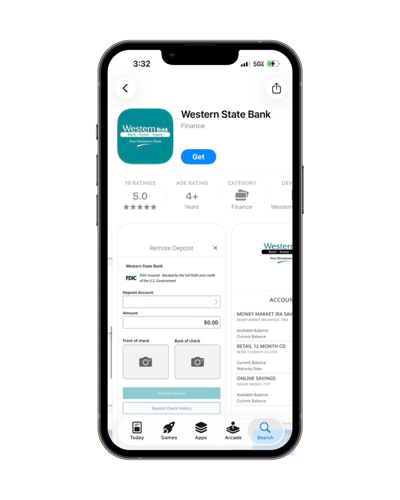
- Download our new mobile banking app from the Apple App Store or Google Play.


- Still have questions? Explore our online banking help guides/videos.
- If you use QuickBooks or Quicken, be sure to complete the remaining conversion instructions today.
- Personal customers: If you use external transfers or CardHub, set them up in the new platform once you've logged in.
- Business customers: Recurring ACH and wire payments will need to be set up in the new system.
What’s new
Here’s a quick look at the new and enhanced features:
- One application for both business and personal banking
- Intuitive navigation and streamlined transactions
- Enhanced security measures
- Direct Deposit Switch, a tool that makes it easier to update your direct deposit information
- SavvyMoney, a financial wellness tool that provides access to credit score and credit report information, credit monitoring alerts and educational resources
- Personal Finance Manager (PFM), a dashboard and planning tool that brings your financial information together in one place
- New ways to receive important alerts and updates from Western
What’s staying the same
While online and mobile banking will look different, the core banking features you rely on will remain the same. Your accounts, transaction history, bill pay information and alerts will carry over to the new platform. Recurring bill payments and recurring transfers between your Western accounts will also carry over. Mobile deposit will continue to be offered in the new platform.
Important dates
Monday, September 28
- eStatement enrollment will no longer be available through the current personal online banking system.
- External transfer access will no longer be available through personal online banking. If you use external transfers, please plan ahead and take note of any transfers you’ll need to set up again in the new system.
Thursday, October 1
- Bill Pay access will no longer be available for personal and business online banking. Please schedule or complete any needed bill payments before this date.
Friday, October 2
- This is the last day external transfers will be processed. Any external transfers scheduled after October 2 will need to be set up again in the new online banking platform.
- 1:00 p.m. (Central): Mobile deposit will become unavailable.
- 3:00 p.m. (Central): The current Western mobile banking app will be removed from app stores.
- 3:00 p.m. (Central): Deadline to submit ACH and wire transfers through online banking.
- 4:00 p.m. (Central): Deadline for Positive Pay. All issued files and checks must be entered by this time.
- 4:00 p.m. (Central): Online and mobile banking will be unavailable as we begin the transition to the new platform.
- 10:00 p.m. (Central): Online banking access through Intuit services, including QuickBooks and Quicken connections, will become unavailable.
Saturday, October 3
- Online and mobile banking will remain unavailable while we continue the transition to the new platform.
Sunday, October 4
- Online and mobile banking will remain unavailable while we continue the transition to the new platform.
Monday, October 5
- Our new online and mobile banking platform goes live.
What personal customers can do to prepare
- Verify your contact information. Make sure Western has your current phone number and email address so you can access the new platform right away.
- Know your username and password. You’ll use your existing username and password to log in to the new platform for the first time. This is especially important if you typically use Face ID, facial recognition or another biometric login on the mobile app.
- Submit external transfers on/before September 28. External transfers will be processed in the current system until October 2, but they will not carry over to the new platform and you’ll need to set them up again.
- If you use QuickBooks or Quicken, be sure to sync your transactions by October 1.
What business customers can do to prepare
- Verify each user’s contact information. Make sure Western has your current phone number and email address so you can access the new platform right away.
- If you use QuickBooks or Quicken, be sure to sync your transactions by October 1.
- If you originate ACH files/wires through online banking:
- ACH files: Submit all payroll, vendor payments or collections before 3:00 p.m. (Central) on October 2.
- Recurring ACH and wire payments will need to be set up in the new system.
- Delete any unused ACH or wire templates.
- If you use Merchant Remote Deposit Capture, there's nothing you need to do. This service is not changing.
- If you log in with DigiPass or Token, you will enter your User ID and then select Forgot Password. You will be asked to obtain a Secure Access Code and change your password. Going forward, you will continue to use your User ID, Password and SAC code for login.
What Quickbooks and Quicken users can do to prepare
The upgrade will require changes to your QuickBooks or Quicken software, so please take action to ensure a smooth transition.
- By October 1: Download your data file and transactions.
- On/after October 5: Complete the remaining conversion instructions listed below. You’ll deactivate/reactivate your online banking connection with Quicken or QuickBooks.
Conversion instructions:
Please note: Intuit aggregation services may be interrupted for up to 3-5 business days following the conversion. You’re encouraged to download a QFX/QBO file during this outage. The following services may not work during the outage:
- Quicken Win/Mac Express Web Connect
- QuickBooks Online Express Web Connect
You’ll want to carefully review downloaded transactions to ensure no transactions were duplicated or missed.
General FAQs
Our new platform goes live on October 5. Western’s online and mobile banking will be temporarily unavailable from October 2 (afternoon) until October 5 while we transition to the new platform.
You’ll notice an updated look and feel, easier navigation and streamlined transactions. The new and enhanced features include:
- One application for both business and personal banking
- Enhanced security measures
- Direct Deposit Switch, a tool that makes it easier to update your direct deposit information
- SavvyMoney, which provides access to credit score and credit report information, credit monitoring alerts and educational resources
- Personal Finance Manager (PFM), a dashboard and planning tool that brings your financial information together in one place
- New ways to receive important alerts and updates from Western
While online and mobile banking will look different, the core banking features you rely on will remain the same. Your accounts, transaction history, bill pay information and alerts will carry over to the new platform. Recurring bill payments and recurring transfers between your Western accounts will also carry over. Mobile deposit will continue to be offered in the new platform.
No. Your Western account number and routing number will not change as part of the online and mobile banking transition.
Yes. You will continue using your current Western debit card and PIN.
Yes. You’ll use your existing username and password when you log in to the new platform for the first time. Make sure you know your username and password before the transition, especially if you typically use Face ID, facial recognition or another biometric login instead of entering your password.
When you log in to the new platform for the first time, you’ll use your existing username and password. You’ll also be asked to complete a few steps to verify your identity and set up access to the new platform.
Multi-factor authentication, or MFA, is an additional step used to help verify your identity when you log in.
The new platform may send a verification code or use another method to confirm it’s really you. That’s why it’s important to make sure Western has your current phone number and email address before launch.
The new platform will use multi-factor authentication (MFA) to help verify your identity. Having your current phone number and email address on file will help ensure you can access the new platform when it launches. If your information needs to be updated, visit your local Western location or call 888-662-4936.
Yes. You’ll need to download Western’s new app to access mobile banking after the transition.
Yes. Biometric login options such as Face ID will continue to be available. However, you’ll first need to log in using your username and password and set up biometric access again in the new mobile app.
Yes. Although online and mobile banking will be unavailable, you’ll still be able to access your accounts using available Western banking services:
- Debit cards
- ATMs
- Checks
- Telephone banking
No. External transfers between Western and accounts at other financial institutions will not carry over to the new platform.
Submit any external transfers you need to make through the current system on or before September 28. Existing external transfers will be processed in the current system through October 2.
Beginning October 5, you can set up your external transfers again in the new platform.
No. Beginning October 5, you can set up your CardHub alerts in the new platform.
Yes. Recurring bill payments will transfer to the new system.
Yes. Recurring transfers between your Western accounts will transfer to the new system.
Yes. Mobile deposit will continue to be available with our new online and mobile banking platform.
Personal Banking Customers
A few simple steps can help you prepare:
- Verify your contact information. Make sure Western has your current phone number and email address.
- Know your username and password. You’ll need them to log in to the new platform for the first time.
- Take note of your external transfers. They will not carry over and will need to be set up again after launch.
- If you use QuickBooks or Quicken, sync and download your transactions by October 1.
No action is needed for recurring bill payments or recurring transfers between your Western accounts. They will carry over to the new platform.
External transfers are different and will need to be set up again after the new platform launches.
Business Banking Customers
Make sure Western has a current phone number and email address for each user who accesses your business accounts. This information will be important when users access the new platform.
If you use QuickBooks or Quicken, also be sure to sync and download your transactions by October 1.
If you originate ACH files through Western online banking, please be sure to submit them by 3:00 p.m. Central on October 2.
No. Recurring ACH and wire payments will need to be set up again in the new system.
No. To login, enter your User ID and then select Forgot Password. You will be asked to obtain a Secure Access Code and change your password. Going forward, you will continue to use your User ID, Password and SAC code for login.
Before conversion, review your ACH and wire templates and delete any that you no longer use.
Yes. Recurring bill payments and payees will carry over to the new platform.
Yes. Recurring transfers between your Western accounts will transfer to the new system.
No. If you use Merchant Remote Deposit Capture, there’s nothing you need to do. This service is not changing.
Yes. Mobile deposit will continue to be available with the new platform.
QuickBooks and Quicken Users
Yes. The upgrade requires changes to your QuickBooks or Quicken connection.
- By October 1: Sync your transactions and download your data file and transactions.
- On or after October 5: Follow the applicable conversion instructions to deactivate and reactivate your online banking connection.
Choose the instructions for the service you use:
Intuit aggregation services may be interrupted for up to 3–5 business days following the conversion.
During that time, the following services may not work:
- Quicken Windows/Mac Express Web Connect
- QuickBooks Online Express Web Connect
You may want to download a QFX or QBO file during the interruption to keep your transactions up to date.
Yes. Carefully review your downloaded transactions after conversion to make sure no transactions were duplicated or missed.
Getting Help
Visit this page for the latest information, step-by-step resources and updates. You can also contact us at 888-662-4936 or visit your local Western location.